
Firewall vs Antivirus: Do You Need Both for Business Protection?
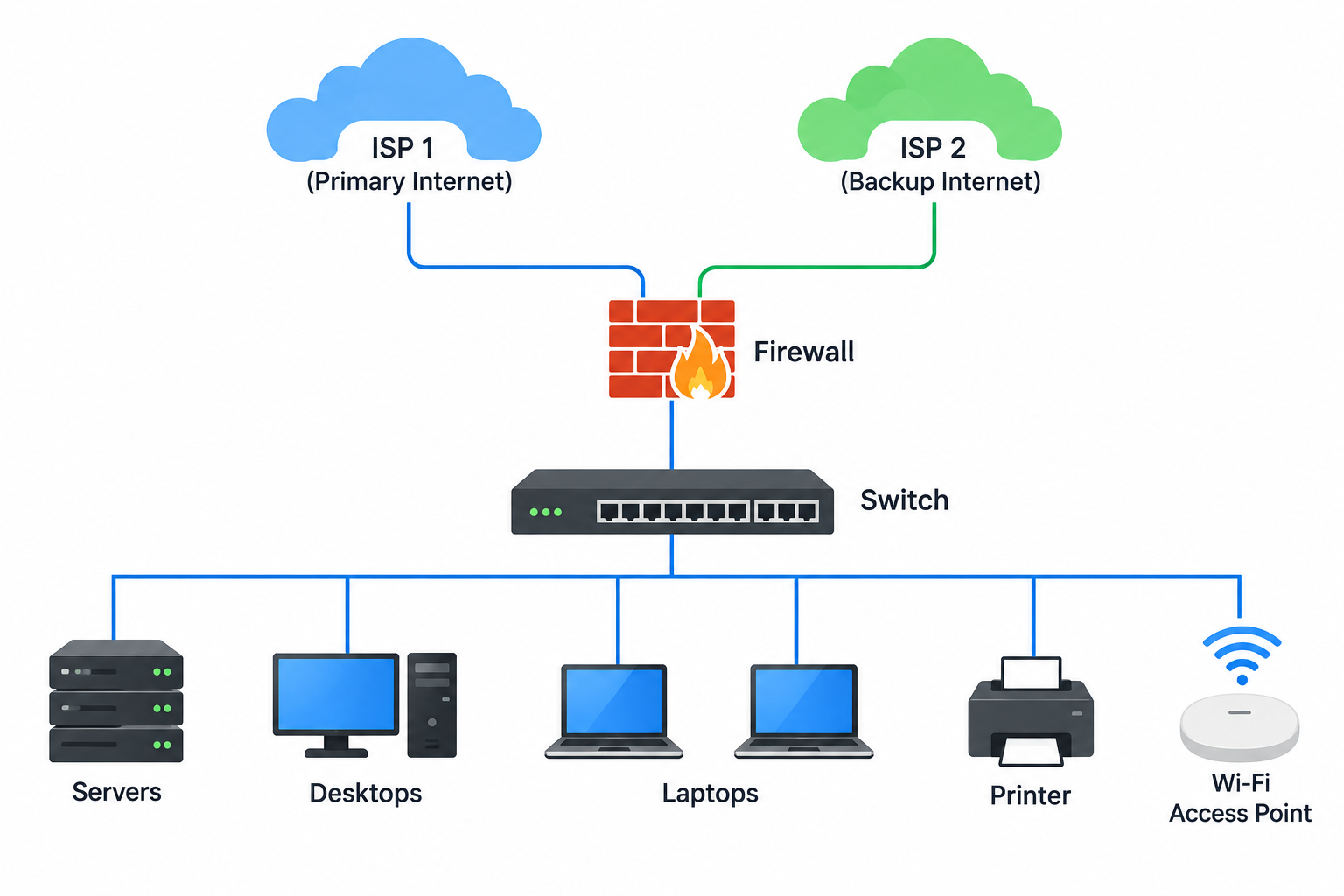
A firewall and antivirus are often mentioned together when businesses talk about cybersecurity, but they do very different jobs. One primarily controls network traffic entering and leaving your environment, while the other protects individual devices from malicious software and suspicious activity.
Understanding the difference is an important part of business cybersecurity basics, particularly for Qatar businesses that rely on cloud applications, Microsoft 365, remote access, IP phones, online services, and connected office systems. If you only deploy one layer, there can still be significant gaps elsewhere in your environment.
So, in the firewall vs antivirus discussion, the practical answer is not about choosing one over the other. A better approach is to understand where each technology fits and how firewalls, endpoint protection, email security, access controls, backups, and user awareness can work together as multiple network security layers.
Firewall vs Antivirus: What Is the Difference?
The easiest way to understand the difference is to think about where each security control operates.
A firewall primarily sits at the network boundary or within the network and controls traffic based on configured security policies. It can inspect connections, restrict unwanted traffic, control applications, provide VPN access, and, depending on the platform, perform additional threat inspection.
Antivirus operates on endpoints such as laptops, desktops, and servers. It is designed to identify, block, quarantine, or otherwise respond to malicious files, applications, and behaviours on those devices.
In simple terms:
| Security technology | Main focus | Typical location |
| Firewall | Network traffic and connections | Network edge / internal network |
| Antivirus / endpoint security | Malware and endpoint activity | Laptops, desktops, servers |
| Email security | Malicious email and attachments | Email environment |
| Identity security | Users and access | Identity systems |
| Backup | Recovery of data and systems | Backup infrastructure |
The technologies overlap in some modern security products, but their fundamental roles remain different.
What Does a Firewall Actually Do?
A business firewall acts as a security control between networks or network zones.
For example, an office might have users accessing the internet, employees connecting remotely, guest Wi-Fi users, and internal servers. The firewall can apply policies that determine which traffic is allowed, restricted, inspected, or blocked.
Modern next-generation firewalls can go beyond basic port and IP filtering. Depending on the product and licensing, they may provide capabilities such as intrusion prevention, web filtering, application control, VPN, malware inspection, and centralized security management.
For example, Fortinet’s FortiGate platform combines firewall functionality with additional security services, while its FortiGuard services provide threat protection capabilities across Fortinet security products.
A firewall therefore helps answer a question such as:
“Should this network connection or traffic be allowed?”
It does not replace security software running on the user’s computer.
What Does Antivirus or Endpoint Protection Do?
Antivirus focuses much more closely on the individual device.
Consider an employee downloading an attachment or installing software on a company laptop. The firewall may have allowed the network connection because the traffic itself appeared legitimate. The endpoint security software can then inspect what happens on the device.
Modern endpoint protection has also moved beyond traditional signature-based antivirus. Depending on the platform, endpoint security can include behavioural analysis, exploit prevention, web filtering, ransomware protection, vulnerability assessment, application control, device isolation, and automated response.
For example, Fortinet’s current FortiClient offering includes endpoint protection capabilities alongside vulnerability management, web filtering, application controls, and automated quarantine features.
This means the endpoint layer can help answer another question:
“Is this file, application, process, or activity safe on the device?”
That is a different security problem from controlling network traffic.
Why a Firewall Cannot Replace Antivirus
This is where many businesses misunderstand the firewall vs antivirus comparison.
A firewall can block certain malicious connections, but it does not mean every malicious file will be detected before it reaches an endpoint.
For example, imagine an employee receives a legitimate-looking email with a malicious attachment.
The email reaches the user’s mailbox. The user downloads the attachment. The file starts executing on the laptop.
At this point, endpoint protection becomes extremely important.
A firewall may have helped prevent communication with a known malicious destination, but endpoint security can provide another layer of inspection directly on the affected device.
This is why modern security architectures use multiple controls instead of expecting one product to stop every type of attack.
Why Antivirus Cannot Replace a Firewall
The opposite is also true.
Suppose a business has strong antivirus protection installed on every laptop. The organization still needs to control how devices communicate with the internet and with other parts of the network.
A firewall can help control:
- Internet access
- Remote access
- VPN connections
- Network segmentation
- Application traffic
- Suspicious connections
- Access between internal network zones
- Traffic entering and leaving the business
Endpoint protection does not provide the same centralized network-level control.
This distinction becomes particularly important in Qatar businesses with servers, guest Wi-Fi, CCTV, IP phones, printers, IoT devices, and multiple departments sharing the same infrastructure.
How Network Security Layers Work Together
Effective cybersecurity is rarely about one product.
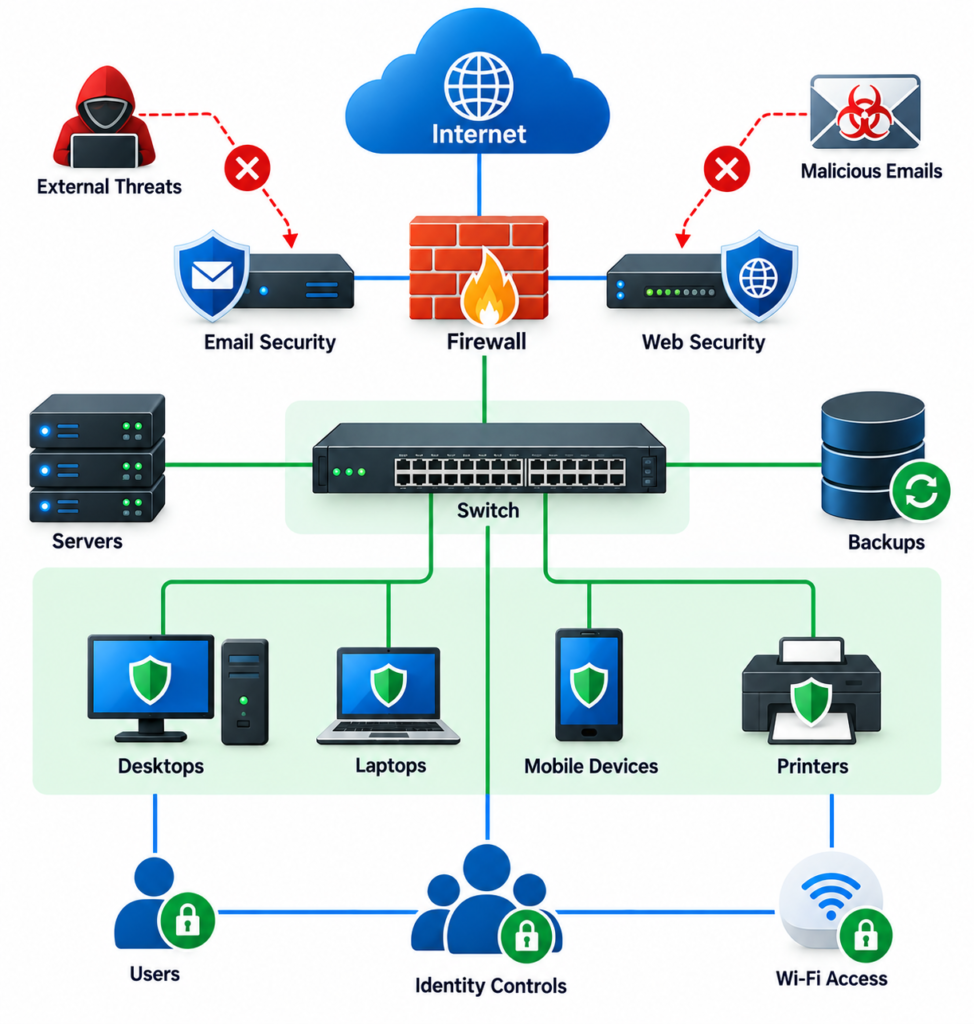
Instead, businesses typically use several network security layers, with each layer addressing different risks.
A practical security architecture might include:
Layer 1: Perimeter and network security
A next-generation firewall can control network traffic, provide VPN connectivity, inspect traffic, and enforce network security policies.
Layer 2: Endpoint protection
Security software protects laptops, desktops, and servers against malware, suspicious behaviour, exploits, and other endpoint threats.
Layer 3: Email security
Email remains an important attack path for phishing, malicious attachments, and business email compromise. Email security adds another inspection layer before messages reach users.
Layer 4: Identity and access controls
Strong passwords, multi-factor authentication, role-based access, and appropriate permissions reduce the damage that can occur when credentials are compromised.
Layer 5: Backup and recovery
If ransomware or another incident affects business data, reliable backups provide a recovery option.
Layer 6: People and processes
Employees need to recognize suspicious messages, unusual login requests, unsafe downloads, and other common warning signs.
No individual layer should be treated as perfect. The objective is to create several opportunities to detect or stop an attack.
Firewall and Endpoint Protection in a Qatar Business Environment
The need for layered security becomes easier to understand when you look at a typical business environment.
A company in Doha might have:
- Office desktops and laptops
- Microsoft 365 accounts
- Wi-Fi access points
- IP phones
- CCTV cameras
- Network printers
- Cloud applications
- Servers or NAS storage
- Remote employees
- Guest devices
- Mobile devices
These devices do not all face the same risks.
A laptop used by an employee can download files and browse websites. A CCTV camera may have a very different network role. A guest device should not necessarily have access to internal servers.
This is why cybersecurity planning should consider who and what needs access to what, rather than simply installing antivirus on computers and assuming the network is protected.
For businesses reviewing their overall security posture, cybersecurity services can include both firewall protection and endpoint security as part of a broader security strategy.
Choosing Firewall and Security Technologies
There is no single firewall or endpoint platform that is automatically right for every business.
The appropriate solution depends on network size, number of users, internet bandwidth, remote-access requirements, existing infrastructure, compliance needs, security skills, and budget.
Fortinet
Businesses looking for an integrated network and endpoint security ecosystem can explore Fortinet’s firewall and endpoint security solutions. FortiClient provides endpoint protection and can integrate with FortiGate and the wider Fortinet Security Fabric.
Sophos
Sophos provides firewall and endpoint security products designed to work together. Its Sophos Firewall platform emphasizes network visibility, centralized management, and threat detection, while its broader security portfolio extends protection to endpoints and other areas.
Businesses can review Sophos Firewall when evaluating next-generation firewall options.
SonicWall
SonicWall provides next-generation firewall platforms for different environments, including SMB, branch, midsize, enterprise, and virtual deployments. Its current firewall portfolio also includes integrations with endpoint security and other security controls.
Businesses evaluating network security options can also review SonicWall’s next-generation firewall solutions.
The important point is not to select a product simply because it includes the word “firewall” or “antivirus.” Look at how the individual technologies fit together and how they will be managed over time.
What Should Small and Medium Businesses Prioritize?
SMEs do not necessarily need the same security architecture as a large enterprise, but they still need more than a single security product.
A practical starting point includes:
Secure the network
Use a properly configured business firewall rather than relying only on the basic security features of an internet router.
Protect every endpoint
Make sure company laptops, desktops, and servers have centrally managed endpoint protection.
Secure user accounts
Use strong authentication and multi-factor authentication for important accounts and cloud services.
Keep systems updated
Operating-system and application vulnerabilities can create opportunities for attackers. Patch management should therefore be part of routine IT operations.
Protect business data
Maintain reliable backups and periodically test whether important data can actually be restored.
Train employees
Technology cannot completely remove the risk created by phishing, social engineering, and unsafe user behaviour.
These are some of the practical business cybersecurity basics that form the foundation before an organization moves into more advanced security controls.
Do You Need Both a Firewall and Antivirus?
For most business environments, using both makes sense because they address different parts of the security problem.
A firewall primarily protects and controls network traffic.
Endpoint protection primarily protects individual devices.
Neither one should be viewed as a complete cybersecurity strategy by itself.
A useful way to think about it is:
Firewall = protect the network
Endpoint protection = protect the device
Layered security = protect the wider business environment
The exact products and configurations will vary, but the principle remains useful for organizations of different sizes.
Practical Takeaways
Before reviewing your company’s cybersecurity setup, consider these questions:
- Is there a business-grade firewall protecting the network?
- Are all company laptops, desktops, and servers covered by centrally managed endpoint protection?
- Are firewall and endpoint alerts being monitored?
- Are important systems separated into appropriate network segments?
- Is multi-factor authentication enabled for critical accounts?
- Are operating systems and applications regularly patched?
- Are backups protected and tested?
- Is email security included in the overall strategy?
- Does the IT team know what to do when an endpoint becomes compromised?
- Are security policies reviewed as the business grows?
A useful security strategy should also be reviewed periodically. New employees, cloud services, remote-working arrangements, additional branches, and connected devices can all change the organization’s risk profile.
Frequently Asked Questions
What is the difference between a firewall and antivirus?
A firewall primarily controls and inspects network traffic, while antivirus or endpoint protection focuses on detecting and responding to malicious software and suspicious activity on individual devices.
Can antivirus replace a firewall?
No. Antivirus protects endpoints, but it does not provide the same centralized network traffic control, segmentation, VPN, and perimeter security capabilities provided by a business firewall.
Can a firewall replace antivirus?
No. A firewall can block malicious traffic and connections, but endpoint protection provides security directly on laptops, desktops, and servers where files, applications, and processes execute.
Do small businesses need both firewalls and antivirus?
Most businesses benefit from using both because they protect different areas of the environment. The appropriate products and level of protection depend on the organization’s size, infrastructure, applications, remote-access requirements, and risk profile.
What are the basic layers of business cybersecurity?
Common layers include network security, endpoint protection, email security, identity and access controls, data backup and recovery, vulnerability management, and employee security awareness.
Conclusion
The firewall vs antivirus question is less about choosing a winner and more about understanding that the two technologies solve different problems.
A firewall can control network traffic and help protect the business network from unwanted connections. Endpoint protection can detect and respond to malicious activity on individual devices. When combined with secure identities, email protection, patching, backups, monitoring, and employee awareness, they become part of a much stronger layered security strategy.
For businesses in Qatar, the right approach is to look at the entire environment rather than purchasing isolated security products. As networks become more connected and employees work across offices, cloud platforms, and remote locations, having the right security layers in place becomes increasingly important.
If your organization is reviewing its cybersecurity architecture, Tasmeem Tech Trading can help assess the network and endpoint environment and identify practical security measures suited to the business.